


An open-source dashboard for GitHub Actions metrics with AI-powered optimization suggestions.
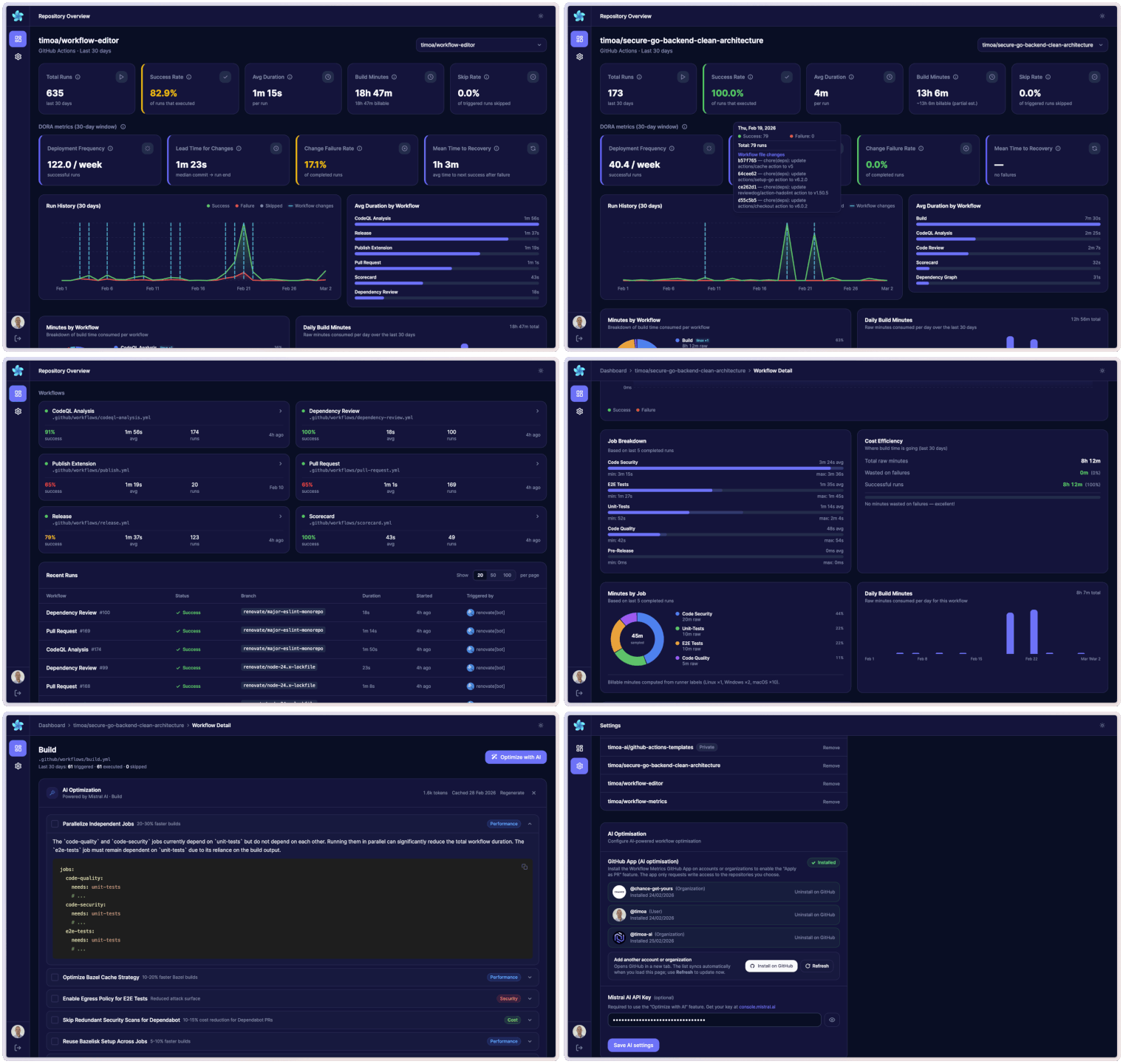
- GitHub OAuth login — Sign in with GitHub using
repoandread:orgscopes to access your workflows - Repository overview dashboard — Total runs, success rate, average duration, active workflows, and 7→30 day progressive loading
- DORA metrics — Deployment Frequency, Lead Time for Changes, Change Failure Rate, and Mean Time to Recovery over the last 30 days
- Run history + workflow-change markers — Visual breakdown of success/failure/cancelled runs plus commit markers when workflow files changed
- Duration by workflow — Bar chart comparing average duration across all workflows
- Build minutes + billable minutes — Raw build minutes with billable estimate using GitHub-hosted runner multipliers (Linux ×1, Windows ×2, macOS ×10)
- Minutes analytics — Minutes by workflow, daily build-minutes trend, per-workflow minutes by job, and daily workflow minutes trend
- Efficiency insights — Wasted minutes on failures, most expensive workflow, costliest branch, and frequency × duration table
- Skip analytics — Global skip rate, per-workflow skip rate, and top skipped workflows table
- Recent runs table — Filterable list of the latest runs with status, branch, actor, and duration
- Workflow list — All workflows with live success rate and quick navigation
- Workflow detail dashboard — Deep dive into a single workflow: P50/P95 duration, build minutes, billable minutes, skip rate, and cost efficiency
- Workflow structure flow chart — Interactive workflow graph (trigger + job dependency DAG) with runner labels and step counts
- Job + step breakdowns — Per-job timing analysis (avg/min/max) and slowest-job step-level breakdown from recent completed runs
- AI optimization with Mistral — Click "Optimize with AI" on any workflow to get streaming, actionable suggestions (caching, parallelization, runner optimization, cost, etc.)
- Apply as PR — Push AI optimization suggestions directly as a pull request via the GitHub App integration
- Settings page — Manage GitHub connections, tracked repositories, Mistral API key, and theme
- Dark / light mode — Dark by default, persisted per user preference
Workflow detail pages include an interactive flow chart that visualizes trigger-to-job execution order and needs dependencies.
flowchart LR
    T([Trigger])
    L[lint]
    U[unit-tests]
    B[build]
    D[deploy]

    T --> L
    T --> U
    L --> B
    U --> B
    B --> D
- Framework: Svelte 5 + SvelteKit 2
- Styling: TailwindCSS 4 +
@tailwindcss/vite - Auth & Database: Supabase (GitHub OAuth + PostgreSQL)
- GitHub API:
@octokit/rest - AI: Vercel AI SDK +
@ai-sdk/mistral(streaming) - Deployment: Cloudflare Pages via
@sveltejs/adapter-cloudflare - Package manager: PNPM
The UI design and color system are inspired by the free template "Dark Admin Dashboard" by Malik Ali.
Figma template: Dark Admin Dashboards.
- Node.js >= 24
- PNPM >= 10
git clone https://github.com/timoa/workflow-metrics.git
cd workflow-metrics
pnpm install- Create a new project at supabase.com.
- Run database migrations (choose one method):
- With Supabase CLI:
Your project ref is in the Supabase dashboard URL:
supabase link --project-ref YOUR_PROJECT_REF
supabase db push
https://supabase.com/dashboard/project/YOUR_PROJECT_REF. - Without CLI: In Supabase Dashboard → SQL Editor, run each file in
supabase/migrations/in numerical order, from001_initial.sqlthrough008_github_app_installations_avatar_name.sql.
- With Supabase CLI:
- Enable GitHub OAuth (use a GitHub OAuth App, not a GitHub App):
- Go to GitHub → Settings → Developer settings → OAuth Apps → New OAuth App.
- Set Authorization callback URL to your Supabase callback:
https://<your-project-ref>.supabase.co/auth/v1/callback. - Copy the Client ID and Client secret, then in Supabase → Authentication → Providers → GitHub, paste them and enable GitHub.
- In Supabase → Authentication → URL Configuration → Redirect URLs, add:
http://localhost:5173/auth/callback
https://your-project.pages.dev/auth/callback
- From Supabase → Project Settings → API, copy:
- Project URL →
PUBLIC_SUPABASE_URL - anon / public key →
PUBLIC_SUPABASE_ANON_KEY - service_role key →
SUPABASE_SERVICE_ROLE_KEY(server-only; bypasses RLS for cache writes — never expose this key to the browser or commit it to source control)
- Project URL →
The "Apply as PR" feature — which pushes AI optimization suggestions directly as a pull request — requires a GitHub App (separate from the OAuth App used for login).
- Go to GitHub → Settings → Developer settings → GitHub Apps → New GitHub App.
- Fill in the details:
- GitHub App name: e.g.
workflow-metrics-bot - Homepage URL: your app URL (e.g.
https://your-project.pages.dev) - Callback URL:
https://your-project.pages.dev/auth/github-app/callback- For local dev, also add:
http://localhost:5173/auth/github-app/callback
- For local dev, also add:
- Webhook: uncheck Active (not needed)
- GitHub App name: e.g.
- Under Repository permissions, set:
- Contents: Read & Write
- Pull requests: Read & Write
- Workflows: Read & Write
- Actions: Read
- Click Create GitHub App.
- On the App settings page, note the App ID →
GITHUB_APP_ID. - Note the App slug from the URL (
github.com/apps/<slug>) →GITHUB_APP_SLUG. - Scroll to Private keys → Generate a private key. A
.pemfile will download.- Collapse the newlines for use as a single-line secret:
awk 'NF {sub(/\r/, ""); printf "%s\\n",$0;}' your-app.pem - Use the output as
GITHUB_APP_PRIVATE_KEY.
- Collapse the newlines for use as a single-line secret:
The "Optimize with AI" feature streams actionable suggestions (caching, parallelization, runner optimization, cost reduction) powered by Mistral AI. The key is per-user and entered in the app Settings page — it is not a server environment variable.
- Sign up or log in at console.mistral.ai.
- Go to API Keys → Create new key.
- Copy the key — you will not be able to see it again.
- After logging into the app, go to Settings and paste the key into the Mistral API key field.
The key is stored encrypted in Supabase and is only used server-side. AI optimization is simply unavailable without one — the rest of the app works normally.
Copy .env.example to .env:
cp .env.example .envFill in the values:
# ── Supabase ──────────────────────────────────────────────────────────────────
PUBLIC_SUPABASE_URL=https://your-project.supabase.co
PUBLIC_SUPABASE_ANON_KEY=your-anon-key
SUPABASE_SERVICE_ROLE_KEY=your-service-role-key

# ── App URL (production only) ─────────────────────────────────────────────────
# Required in production so OAuth redirects back to the correct URL.
# Leave commented out for local dev — the app uses the request origin automatically.
# PUBLIC_APP_URL=https://your-project.pages.dev

# ── GitHub App (for "Apply as PR") ───────────────────────────────────────────
GITHUB_APP_ID=your-numeric-app-id
GITHUB_APP_PRIVATE_KEY="-----BEGIN RSA PRIVATE KEY-----\n...\n-----END RSA PRIVATE KEY-----"
GITHUB_APP_SLUG=your-github-app-slug| Variable | Required | Description |
|---|---|---|
PUBLIC_SUPABASE_URL |
Yes | Supabase project URL |
PUBLIC_SUPABASE_ANON_KEY |
Yes | Supabase anon (public) key |
SUPABASE_SERVICE_ROLE_KEY |
Yes | Supabase service role key — bypasses RLS for server-side cache writes. Never expose this to the browser or commit it to source control |
PUBLIC_APP_URL |
Production only | Your deployed app URL (e.g. https://your-project.pages.dev), no trailing slash |
GITHUB_APP_ID |
Yes | Numeric App ID from GitHub App settings |
GITHUB_APP_PRIVATE_KEY |
Yes | RSA private key from GitHub App settings (full PEM, newlines as \n) |
GITHUB_APP_SLUG |
Yes | URL slug of your GitHub App (e.g. workflow-metrics-bot) |
pnpm devOpen http://localhost:5173.
Connect your GitHub repository to Cloudflare Pages with these build settings:
- Build command:
pnpm run build - Build output directory:
.svelte-kit/cloudflare - Node.js version: 24
In Cloudflare Pages → Settings → Environment Variables, add all variables from the table above, including PUBLIC_APP_URL set to your production URL.
| Variable | Description |
|---|---|
PUBLIC_SUPABASE_URL |
Supabase project URL |
PUBLIC_SUPABASE_ANON_KEY |
Supabase anon (public) key |
SUPABASE_SERVICE_ROLE_KEY |
Supabase service role key |
PUBLIC_APP_URL |
Your production app URL (e.g. https://your-project.pages.dev) |
GITHUB_APP_ID |
GitHub App ID |
GITHUB_APP_PRIVATE_KEY |
GitHub App RSA private key (full PEM, newlines as \n) |
GITHUB_APP_SLUG |
GitHub App URL slug |
In Supabase → Authentication → URL Configuration → Redirect URLs, ensure all URLs are listed:
http://localhost:5173/auth/callback
https://your-project.pages.dev/auth/callback
https://your-custom-domain.com/auth/callback   ← if using a custom domain
See supabase/migrations/001_initial.sql for the full schema with RLS policies.
Tables:
github_connections— GitHub OAuth tokens per userrepositories— Tracked repositories per useruser_settings— Mistral API key (encrypted), theme, default repoworkflow_runs_cache— Cached workflow run data to reduce GitHub API callsworkflow_detail_runs_cache— Cached per-workflow run detailsoptimization_history— History of AI optimization suggestions per workflowgithub_app_installations— GitHub App installation records per repository
Workflow Editor — A VSCode extension that lets you edit GitHub Actions workflow files visually: jobs and dependencies as an interactive diagram, trigger configuration, matrix strategy, and step editing — all without touching YAML directly. A great companion to Workflow Metrics when you want to act on the insights and improve your workflows.
Contributions welcome! See CONTRIBUTING.md for setup, coding standards, and the PR process.
MIT