





What.can.OpenStoryline.do.mp4
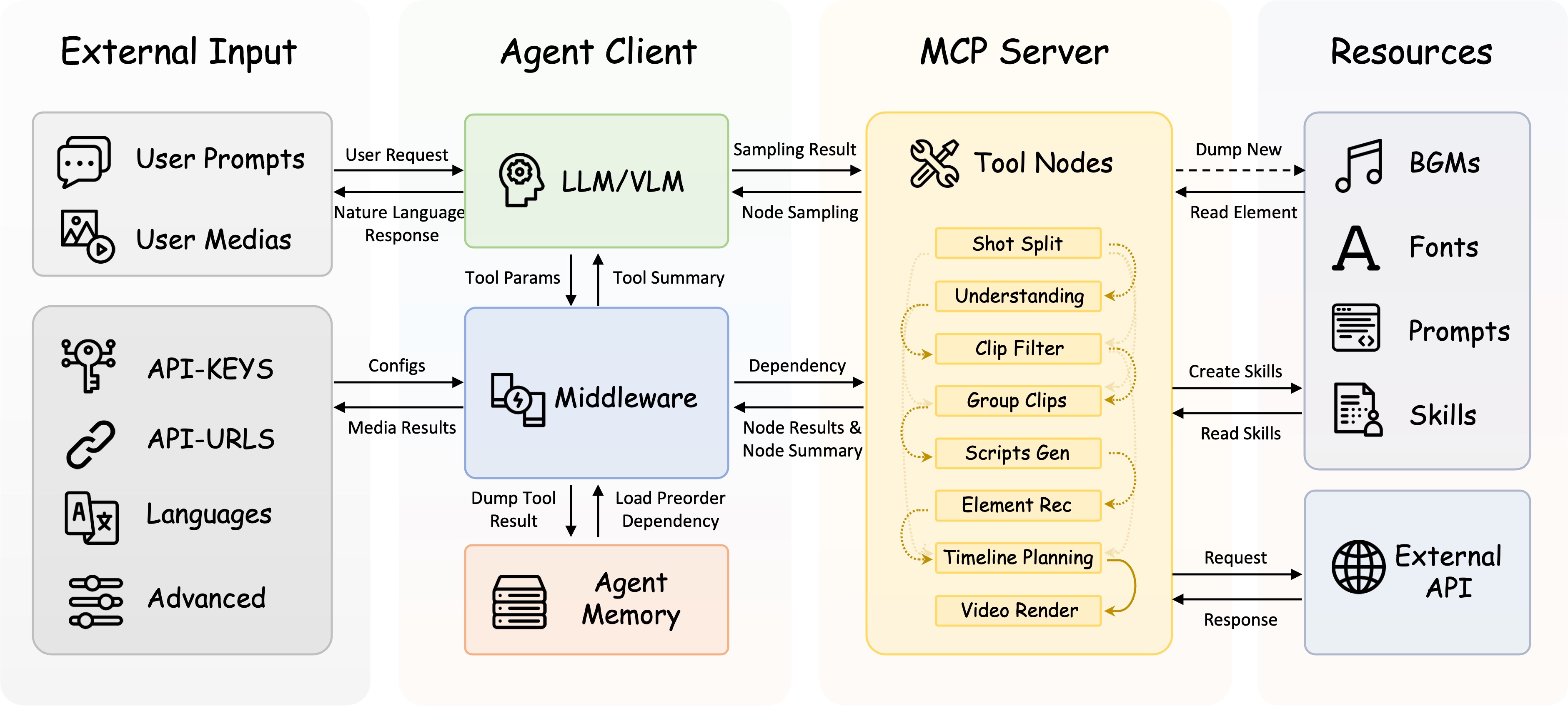
FireRed-OpenStoryline turns complex video creation into natural, intuitive conversations. Designed with both accessibility and enterprise-grade reliability in mind, FireRed-OpenStoryline makes video creation easy and friendly to beginners and creative enthusiasts alike.
Deriving from the saying "A single spark can start a prairie fire", the name FireRed represents our vision: to spread our SOTA capabilities—honed in real-world scenarios—like sparks across the wilderness, igniting the imagination of developers worldwide to reshape the future of AI together.
- 🌐 Smart Media Search & Organization: Automatically searches online and downloads images and video clips that match your requirements. Performs clip segmentation and content understanding based on your thematic media.
- ✍️ Intelligent Script Generation: Combines user themes, visual understanding, and emotion recognition to automatically construct storylines and context-aware narration. Features built-in Few-shot style transfer capabilities, allowing users to define specific copy styles (e.g., product reviews, casual vlogs) via reference text, achieving precise replication of tone, rhythm, and sentence structure.
- 🎵 Intelligent Music, Voiceover & Font Recommendations: Supports personal playlist imports and auto-recommends BGM based on content and mood, featuring smart beat-syncing. Simply describe the desired tone—e.g., "Restrained," "Emotional," or "Documentary-style"—and the system matches suitable voiceovers and fonts to ensure a cohesive aesthetic.
- 💬 Conversational Refinement: Rapidly cut, swap, or resequence clips. Edit scripts and fine-tune visual details—including color, font, stroke, and position. All edits are performed exclusively via natural language prompts with immediate results.
- ⚡Editing Skill Archiving: Save your complete editing workflow as a custom Skill. Simply swap the media and apply the corresponding Skill to instantly replicate the style, enabling efficient batch creation.
- 🔥 2026-03-12: Integrated with OpenClaw, adding two OpenClaw Skills —
openstoryline-installandopenstoryline-use— covering the initial installation/first-run workflow and the actual usage workflow, respectively. Also added Skill usage instructions for Claude Code, making it easier for Claude Code to install and invoke the project in accordance with the repository guidelines. - 2026-02-10: FireRed-OpenStoryline was officially open-sourced.
| Zhongcao Style | Humorous Style | Product Picks | Artistic Style |
0001.mp4 |
0002.mp4 |
0003.mp4 |
0004.mp4 |
| Unboxing | Talking Pet | Travel Vlog | Year-in-Review |
0005.mp4 |
0006.mp4 |
0007.mp4 |
0008.mp4 |
🎨 Effects Note: Due to licensing restrictions on open-source assets, the elements (fonts/music) in the first row represent only basic effects. We highly recommend following the Custom Asset Library Tutorial to unlock commercial-grade fonts, music, and VFX for significantly better video quality.
⚠️ Quality Note: To save space in the README, the demo videos are heavily compressed. The actual output retains the original resolution by default and supports custom dimensions.
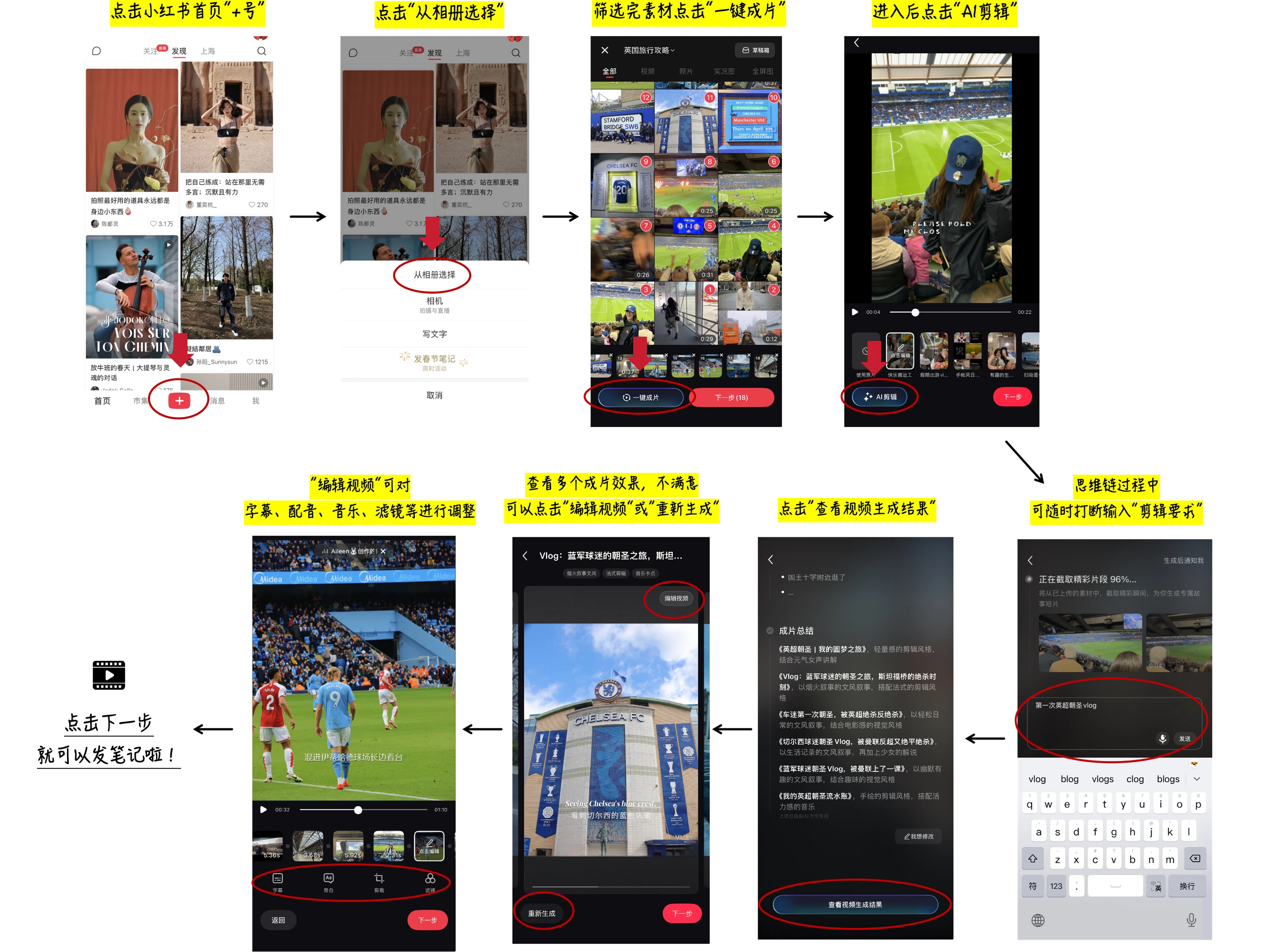
In the Demo: The first row shows default open-source assets (Restricted Mode); the second row shows Xiaohongshu App "AI Clip" asset library effects. 👉 Click to view tutorial
⚖️ Disclaimer: User footage and brand logos shown in the demos are for technical demonstration purposes only. Ownership belongs to the original creators. Please contact us for copyright concerns.
FireRed-OpenStoryline supports usage through Agent Skills.
We provide two OpenClaw Skills:
openstoryline-install: for installation, configuration, and first-run verification.openstoryline-use: for starting the service and running the actual video editing workflow.
npm i -g clawhub
clawhub install openstoryline-install
clawhub install openstoryline-use
After installation, you only need to send your media source paths to OpenClaw, and it can help you complete the entire process from installing FireRed-OpenStoryline to generating the final video.
This repository includes built-in Claude Code Skills. If you launch Claude Code from the repository root, you can directly use the project-level Skills included in this repo, and Claude Code can help you install FireRed-OpenStoryline.
/openstoryline-installIf you want to install the Skill into your own global Claude Code configuration, run:
mkdir -p ~/.claude/skills
cp -R .claude/skills/openstoryline-install ~/.claude/skills/# If git is not installed, refer to the official website for installation: https://git-scm.com/install/
# Or manually download the code
git clone https://github.com/FireRedTeam/FireRed-OpenStoryline.git
cd FireRed-OpenStoryline
Install Conda according to the official guide (Miniforge is recommended, it is suggested to check the option to automatically configure environment variables during installation): https://docs.conda.io/projects/conda/en/latest/user-guide/install/index.html
# Recommended python>=3.11
conda create -n storyline python=3.11
conda activate storyline
sh build_env.sh
-
Step 1: Install wget (if not already installed)
# MacOS: If you haven't installed Homebrew yet, please install it first: https://brew.sh/ brew install wget # Ubuntu/Debian sudo apt-get install wget # CentOS sudo yum install wget -
Step 2: Download Resources
chmod +x download.sh
./download.sh
-
Step 3: Install Dependencies
pip install -r requirements.txt
-
Step 1: Prepare Directory: Create a new directory named
.storylinein the project root directory. -
Step 2: Download and Extract:
-
Download Models (models.zip) -> Extract to the
.storylinedirectory. -
Download Resources (resource.zip) -> Extract to the
resourcedirectory.
-
-
Step 3: Install Dependencies:
pip install -r requirements.txt
Note: Before starting, you need to configure the API-Key in config.toml first. For details, please refer to the documentation API-Key Configuration
PYTHONPATH=src python -m open_storyline.mcp.server$env:PYTHONPATH="src"; python -m open_storyline.mcp.server
-
Method 1: Command Line Interface
python cli.py
-
Method 2: Web Interface
uvicorn agent_fastapi:app --host 127.0.0.1 --port 8005
# Pull image from Docker Hub official repository
# Recommended for users outside China
docker pull openstoryline/openstoryline:v1.0.0

# Pull image from Alibaba Cloud Container Registry
# Recommended for users in China (faster and more stable)
docker pull crpi-6knxem4w8ggpdnsn.cn-shanghai.personal.cr.aliyuncs.com/openstoryline/openstoryline:v1.0.0docker run \
-v $(pwd)/config.toml:/app/config.toml \
-v $(pwd)/outputs:/app/outputs \
-v $(pwd)/run.sh:/app/run.sh \
-p 7860:7860 \
openstoryline/openstoryline:v1.0.0
After starting, access the Web interface at http://0.0.0.0:7860
FireRed-OpenStoryline/
├── 🎯 src/open_storyline/           Core application
│   ├── mcp/                         🔌 Model Context Protocol
│   ├── nodes/                       🎬 Video processing nodes
│   ├── skills/                      🛠️ Agent skills library
│   ├── storage/                     💾 Agent Memory
│   ├── utils/                       🧰 Helper utilities
│   ├── agent.py                     🤖 Build Agent
│   └── config.py                    ⚙️ Configuration management
├── 📚 docs/                         Documentation
├── 🐳 Dockerfile                    Docker Configuration
├── 💬 prompts/                      LLM prompt templates
├── 🎨 resource/                     Static resources
│   ├── bgms/                        Background music library
│   ├── fonts/                       Font files
│   ├── script_templates/            Video script templates
│   └── unicode_emojis.json          Emoji list
├── 🔧 scripts/                      Utility scripts
├── 🌐 web/                          Web interface
├── 🚀 agent_fastapi.py              FastAPI server
├── 🖥️ cli.py                        Command-line interface
├── ⚙️ config.toml                   Main configuration file
├── 🚀 build_env.sh                  Environment Build Script
├── 📥 download.sh                   Resource downloader
├── 📦 requirements.txt              Runtime dependencies
└── ▶️ run.sh                        Launch script
- API Key Configuration - How to configure and manage API keys
- Usage Tutorial - Common use cases and basic operations
- FAQ - Frequently asked questions
- Add the function of voiceover type video editing.
- Add support for voice cloning
- Add more transition/filter/effects effects functions.
- Add image/video generation and editing capabilities.
- GPU-accelerated rendering and highlight selection.
This project is built upon the following excellent open-source projects:
- MoviePy - Video editing library
- FFmpeg - Multimedia framework
- LangChain - A framework that provides pre-built Agents
This project is licensed under the Apache License 2.0 - see the LICENSE file for details.